


Monitoring Systems
Web & PC Monitoring System
A monitoring system that shows sensor location, status and history on a map screen
Self-powered sensor icons are placed on the site drawing (MAP), and when a sensor operates, alerts are given by icon highlighting, pop-ups, voice and text messages. It runs as an on-site PC program and as cloud server-based web monitoring.
- DisplayMAP-based sensor icons
- RecordsDetection history saved
- AlertsSMS text messaging
- WebCloud server-based web monitoring
01How it works
- Sensor operates
The self-powered sensor sends a signal.
- Signal Monitor → PC
The signal is passed to the PC program via RS485.
- MAP display · history saved
The location is highlighted and detection history accumulates.
- Text messages · Web
Viewed on the manager's mobile phone and on the web screen at the same time.
02Features
Sensor icons placed on the site drawing show locations at a glance.
Records when and which sensor operated.
Set recipients and message text in the program and send in real time.
Check remotely over the internet.
Sensors under inspection can be turned off and on from the screen.
03System configuration
 Emergency bellEmergency call
 Fire detection sensorFixed-temperature
 Valve sensorOpen / Close
 Door sensorOpen / Close
 RepeaterMWSR2-900 · Optional
 Signal MonitorMWSM-700
 PC monitoringSensor location · detection history
 Text alertsManager's mobile phone
Ranges are based on open field with no obstacles. Each added repeater extends the range by approx. 1 km.
04Specifications
Receiving · monitoring devices used together

PC monitoring program
Model —
| Operating environment | Runs on an on-site PC |
|---|---|
| Map | MAP layout (sensor location check) |
| Sensor display | Icon for each self-powered sensor |
| History management | Detection history saved |
| Protocol | RS485 |
| Port | RS485 to USB cable |
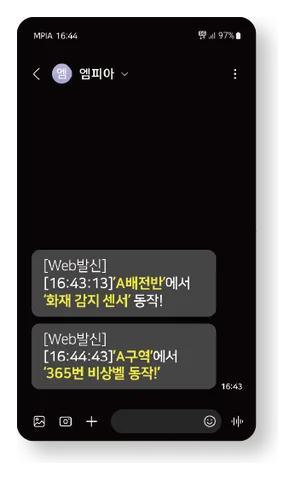
Text message (SMS) delivery
Model —
| Operating environment | Internet-connected PC with the monitoring program installed |
|---|---|
| ID registration | Phone number registration |
| Message text | Edit · delete beyond the default text |
| History management | Text message history management |
| Protocol | Internet-based |
Specifications are subject to change without notice for performance improvement.
05Applications
Fire monitoring in utility tunnels where sensors are hard to install
Access · emergency monitoring
Integrated valve · door · temperature monitoring
Integrated monitoring for disaster prevention
Applicable platforms
A disaster monitoring system that monitors the temperature, doors and emergencies of switchgear using self-powered sensors
Distribution Panel Power Safety PlatformA disaster monitoring system that monitors emergency, fire and door information in extra-high-voltage switchgear using self-powered sensors
Cable Joint Power Safety PlatformA disaster prevention system that remotely monitors fire detection sensor data from cable joints
GIS Substation Power Safety PlatformA system that mounts self-powered sensors on gas valves to show GIS valve open/close status on an LCD panel and sends the status to SCADA to prevent mis-operation
06Materials · videos
07FAQ
QWhat kind of PC does it run on?
Install the monitoring program on an on-site PC and connect the Signal Monitor with an RS485 to USB cable. Text messages are sent from an internet-connected PC.
QHow is the drawing created?
The site drawing image is configured as a MAP and sensor icons are placed on it. We support the configuration during installation.
QCan it be viewed remotely?
Yes, with cloud server-based web monitoring you can check remotely.
CONTACT MPIA
Web & PC Monitoring System
A monitoring system that shows sensor location, status and history on a map screen